SEO for Engineers — Beyond Meta Tags
Most articles about SEO are bad. They optimize for the algorithm of an SEO industry — keyword stuffing, link exchanges, 'ten meta tags Google loves' — that h...

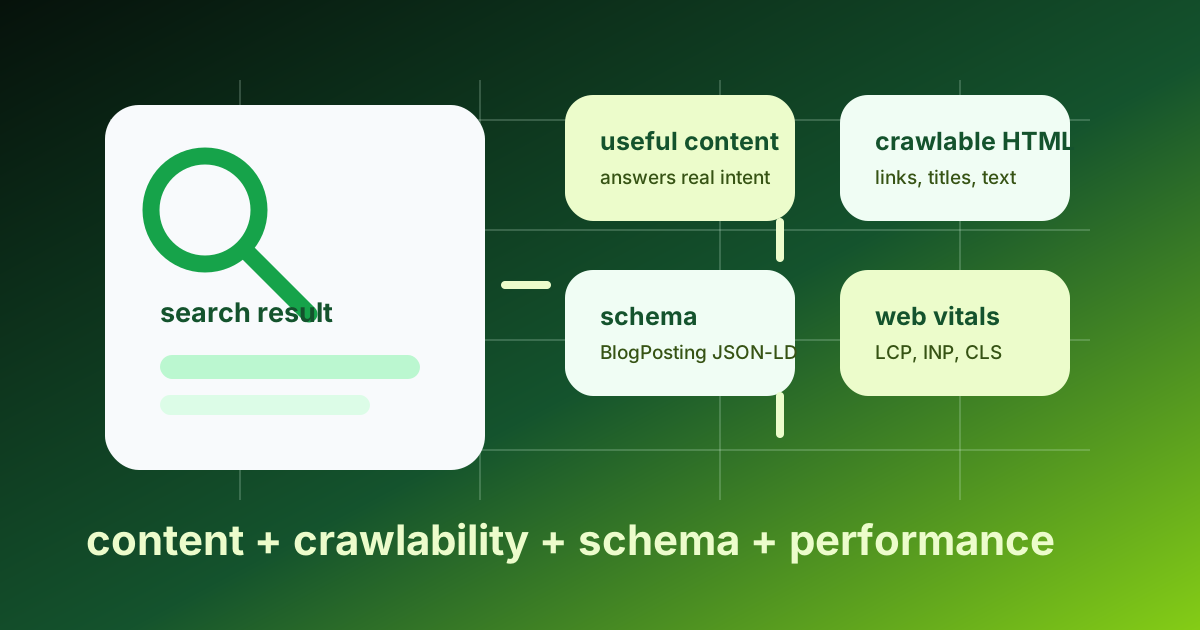
SEO Without the Snake Oil
Most articles about SEO are bad. They optimize for the algorithm of an SEO industry — keyword stuffing, link exchanges, "ten meta tags Google loves" — that has very little overlap with what search engines actually weight in 2026. The legitimate engineering layer of SEO is genuinely interesting and is mostly ignored by content marketers because it requires reading specifications and writing code.
This article is the engineering layer. The structural, technical, and infrastructural decisions that affect search ranking, in the order of impact. Not "ten quick tips." The real list.
If you are an engineer building a site that needs to be findable, this is the article that takes you past meta tags into the parts that matter.
What Search Engines Actually Want
A modern search engine has three jobs:
- Crawl the web — find every URL.
- Index what it finds — understand what each page is about.
- Rank the results — for a given query, return the pages most likely to be useful.
The first two used to be the bottleneck for sites. They mostly are not anymore — Google's crawler reaches just about every public site, and modern indexing handles JavaScript-rendered content (with caveats). The third is where the engineering work lives. Ranking depends on hundreds of signals, but the categories that matter most for an engineer to optimize are:
- Page speed and Core Web Vitals. Direct ranking signal since 2021.
- Mobile experience. Mobile-first indexing since 2019.
- Content match. Does the page actually answer the query?
- Structured data. Helps the engine understand what the page is.
- Technical correctness. Sitemap, robots.txt, canonical URLs, HTTPS.
- Authority signals. Links from other reputable sites.
The first five are entirely under your control. The sixth is a function of how good your content is and how much marketing you do — which is its own discipline. This article focuses on the first five.
Core Web Vitals — The Performance Signals
Google measures three concrete metrics for each page and uses them as a ranking factor:
- Largest Contentful Paint (LCP) — how long until the largest visible element renders. Target: under 2.5 seconds.
- Interaction to Next Paint (INP) — how long the worst input-handling lag is. Target: under 200 milliseconds.
- Cumulative Layout Shift (CLS) — how much elements jump around as the page loads. Target: under 0.1.
These are not abstract scores; Google's Search Console shows you exactly which pages are failing each metric, and the failing pages get demoted in search results. The fix list is concrete:
- Serve from an edge CDN. Cuts LCP by 100-300ms for users far from your origin.
- Compress images aggressively. Use modern formats (AVIF, WebP) with appropriate dimensions. The Largest Contentful Paint is almost always an image.
- Use
loading="lazy"for below-fold images. Stops the browser from prioritizing them over LCP. - Inline critical CSS. The first paint should not wait for an external CSS file.
- Defer non-critical JavaScript. A heavy script bundle blocks INP. Use
deferor move work to web workers. - Reserve space for images. Set
widthandheightso the layout does not shift when they load. CLS is mostly image and ad reflow.
A static site (SSG) on a CDN with these basics dialed in routinely scores 95+ on Lighthouse with no further optimization. A heavy SPA with multiple ad networks and analytics scripts struggles to break 60 even after a week of work. Your architecture choices upstream determine your Core Web Vitals ceiling.
Mobile Experience
Google's indexing has been mobile-first since 2019. The page Google actually indexes is the version a mobile user agent fetches. If your mobile experience is broken — text too small, buttons too close together, content cut off — your rankings suffer regardless of how the desktop version looks.
Test in Chrome DevTools' device emulation, then test on a real low-end Android phone (a $150 device on a 4G connection in a coffee shop is the realistic worst-case for a working professional). The site has to work there. Specific things that hurt:
- Hamburger menus that hide important navigation. Some content needs to be reachable in fewer than three taps.
- Modal pop-ups on mobile. Google explicitly penalizes "intrusive interstitials" — newsletter modals, app install banners that block content. Use them minimally and never in the first second.
- Tiny tap targets. Apple recommends 44px minimum for tap targets; the rule of thumb on the web is similar. Don't make users zoom to tap a link.
- Horizontal scrolling. The content should fit the viewport. If users have to scroll horizontally, the layout is broken.
The fix for most of this is straightforward CSS. Modern responsive design with appropriate breakpoints and min()/max()/clamp() for fluid sizing makes mobile not a separate consideration — it is just how the site renders at narrow viewports.
Content That Actually Matches Queries
The single biggest factor in ranking is whether the content answers the query a user typed. This is not a hack you can engineer at a CSS level — it is the actual writing. But there are engineering-adjacent decisions that materially help:
- One topic per URL. A page that tries to rank for ten different queries usually ranks for none. Pick one query, build the page around that query, link to other pages for the related topics.
- Match the search intent. A query like "what is JSON" wants a definition; a query like "JSON parsing python" wants code. The page structure should match. A how-to article for a definitional query rarely ranks.
- Use the actual words searchers use. If everyone calls it "kubernetes ingress controller" but you keep saying "k8s edge router," your page does not match. A small amount of keyword research (at minimum, Google's autocomplete and "people also ask") catches the vocabulary mismatch.
- Use proper heading hierarchy. H1 for the page topic, H2 for major sections, H3 for sub-sections. Google's algorithms parse this structure to understand the page.
- Internal links between related pages. A blog with 30 posts that link to each other appropriately ranks better than 30 isolated posts.
The intuition: pretend you are explaining the page to a smart friend who has not heard of your site. Does the page actually deliver what its title promises? The algorithms have gotten remarkably good at noticing when a page does not.
Structured Data — Telling the Engine What the Page Is
Search engines use structured data (JSON-LD blocks in your HTML) to understand a page beyond the visible text. A blog post might have:
<script type="application/ld+json">
{
  "@context": "https://schema.org",
  "@type": "Article",
  "headline": "How HTTP Actually Works",
  "author": { "@type": "Person", "name": "Divyanshu Singh Chouhan" },
  "datePublished": "2026-03-08T11:00:00Z",
  "dateModified": "2026-03-08T11:00:00Z",
  "image": "https://abcsteps.com/images/blog-covers/seo-for-engineers.svg"
}
</script>
This is what enables rich results — the article cards with author, date, and image that show up in Google search. There is a Schema.org type for almost everything: Recipe, Event, Product, FAQPage, BreadcrumbList, LocalBusiness. Adding the right type to the right page is one of the highest-leverage SEO moves; it costs an hour and earns you better-looking search results forever.
Google's Structured Data Testing Tool (now Rich Results Test) validates the JSON-LD on any URL. Run it on your live pages — the tool tells you exactly which fields are missing and what rich result eligibility you have.
The Plumbing — Sitemap, Robots, Canonical
Three small pieces of plumbing that every public site needs:
robots.txt at /robots.txt. Tells crawlers what to index and what to skip. The default for a public site is permissive:
User-agent: *
Allow: /

Sitemap: https://your-domain.com/sitemap.xml
sitemap.xml at /sitemap.xml. Lists every URL you want indexed, with <lastmod> for each. Modern frameworks (Nuxt's @nuxtjs/sitemap, Next.js app/sitemap.ts, Astro's @astrojs/sitemap) generate this automatically from your route structure. Submit it to Google Search Console and Bing Webmaster Tools.
Canonical URLs via <link rel="canonical" href="..."> in each page's <head>. If a page is reachable at multiple URLs (with/without trailing slash, with/without ?utm= parameters), the canonical tells Google which is the "real" one. Wrong or missing canonicals are a common cause of pages losing rankings to their own duplicates.
These three are baseline hygiene. Every site has them. If yours does not, fix that first, before any deeper SEO work.
HTTPS, Security Headers, and Trust
A few small technical signals worth dialing in:
- HTTPS everywhere. Google has used HTTPS as a ranking signal since 2014. There is no reason to run a public site over HTTP in 2026; Cloudflare and Let's Encrypt make HTTPS free.
- HSTS (HTTP Strict Transport Security). Tells browsers "always use HTTPS for this domain." A header that costs nothing and improves both security and trust.
- Modern security headers.
Content-Security-Policy,X-Content-Type-Options: nosniff,Referrer-Policy: strict-origin-when-cross-origin. These do not directly help SEO but they signal a well-maintained site, which helps reputation over time. - Mobile-friendly viewport.
<meta name="viewport" content="width=device-width, initial-scale=1">in<head>. Without it, mobile browsers render the page at desktop width and zoom out. Google penalizes pages that fail mobile-friendly testing.
What Stops Mattering
Some advice you will see in older SEO articles is now stale or counterproductive:
- Keyword density. Aiming for a target keyword-density ratio used to be a thing. Modern search algorithms understand topic semantically, not by keyword count. Write for humans.
- Meta keywords tag. Google has not used
<meta name="keywords">since 2009. Skip it. - Hidden text. White text on white background to stuff keywords. This was an algorithm-evading tactic decades ago and is now an algorithm-detected anti-pattern. Modern crawlers parse computed CSS and notice.
- Article length for length's sake. "Pages must be 2,000+ words to rank." False. Pages must answer the query well. A 600-word page that fully answers a specific query beats a 3,000-word page padded to hit a number.
- Buying backlinks. Google's spam team is good at detecting paid link schemes and the punishment is severe. Don't.
The signal-to-noise on SEO content is poor. The advice in this article is what survives because it corresponds to how search engines actually work in 2026.
Where This Fits
Lesson 19 of the ABCsteps curriculum is the polish phase before shipping. SEO is part of that polish. With this article in your head, "polish for SEO" stops meaning "add some meta tags" and starts meaning "verify Core Web Vitals are green, structured data is correct, sitemap is clean, mobile experience is solid." That is the engineering layer. The content layer — actually writing things people search for — is the work that comes after, and it is its own discipline.
Apply this hands-on · Module D
Final Polish and Verification
Lesson 19 polishes the project for shipping. SEO is part of that polish. This article goes past the meta-tag checklist into the structural decisions search engines actually weigh.



Skill vocabulary from the lesson
Tool logos are curriculum references only: no affiliation, hiring promise, salary promise, or placement guarantee.
Company skill surface
Product teams remember engineers who finish the last mile: defects, states, copy, responsiveness, and proof.





Team contexts
Frontend product teams, Quality engineering, Design engineering
Proof prompt
Show the defect list, fixes made, regression check, and the final diff that proves the product is cleaner.
Company and platform logos are ecosystem references only: no affiliation, endorsement, interview access, hiring preference, salary outcome, or placement guarantee.
Open lesson
Divyanshu Singh Chouhan
Founder, ABCsteps Technologies
Founder of ABCsteps Technologies. Building a 20-lesson AI engineering course that teaches AI, ML, cloud, and full-stack development through written lessons and real projects.


After this article
Choose the next proof-bearing step.
Do not collect another article by default. Move into a public lesson, continue a focused path, or bring a concrete repo question to a paid-plan conversation.
Use paid guidance only when it changes the artifact: a repo, demo, written note, architecture decision, or review trail another person can inspect.
BuildContinue public lessons
Open the 20-lesson path and turn the concept into a runnable artifact.
 Read
ReadFollow a focused path
Use a short article sequence only when one lesson needs more context.
DecideCompare plans
Use a paid plan only if feedback, accountability, or review would change the work.
 Ask
AskAsk with context
Send the lesson, repo, error, or decision you want reviewed before scheduling a call or review.
Related Articles
On this page
Article context
Product interface surface
Read this article as web vocabulary: browser behavior, interface structure, client-server boundaries, and user-facing state.


Tool and platform logos are article-context references only: no affiliation, endorsement, interview access, hiring promise, salary promise, or placement guarantee.
Share