Cloudflare Pages — How Static Sites Reach a Global Audience
Twenty years ago, hosting a website meant renting a server and putting Apache or nginx on it. Ten years ago, it meant renting a virtual machine on AWS or Dig...

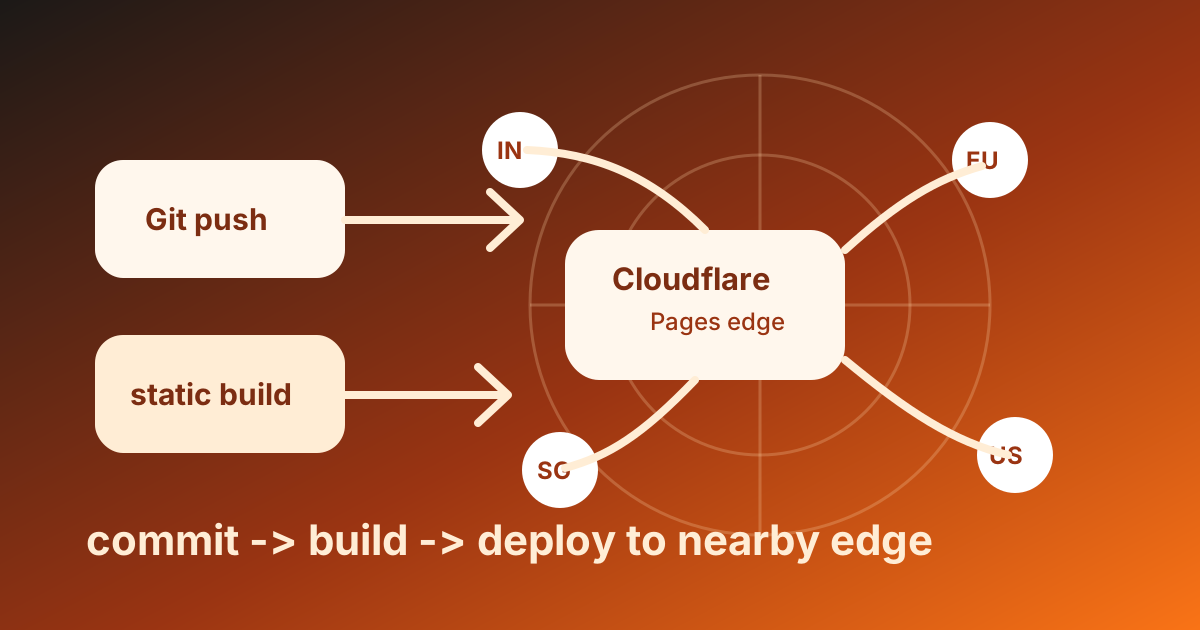
Where Static Sites Live in 2026
Twenty years ago, hosting a website meant renting a server and putting Apache or nginx on it. Ten years ago, it meant renting a virtual machine on AWS or DigitalOcean. Five years ago, it meant pushing to a service like Netlify that handled the boring parts. Today, for static and mostly-static sites, the right answer is usually Cloudflare Pages — and the reasons are worth understanding even if you end up using something else.
This article is what Cloudflare Pages is, how it differs from a normal web host, why "edge hosting" matters for actual users, and the deploy workflow that turns a Git push into a globally available website in under a minute.
What Cloudflare Pages Actually Is
Cloudflare Pages is a static site host that runs on Cloudflare's global edge network — the same 300+ data centers that serve Cloudflare's CDN traffic. You connect a Git repository, Cloudflare runs your build, and the resulting static files (HTML, CSS, JS, images) get pushed to every edge location at once. When a user visits your site, they connect to the closest edge — usually within 50ms — and get the assets from there.
The mental model is simpler than a traditional host because there is no origin server in the usual sense. There is no machine you SSH into. There is no Apache config to tune. There is just a folder of static files replicated to 300+ locations and served by Cloudflare's CDN. If a region goes down, the others keep serving.
The free tier is generous to the point of being unusual: unlimited bandwidth, unlimited requests, unlimited sites, free TLS, free custom domains, GitHub/GitLab integration, build environment, preview deployments per pull request. There is a soft limit on builds per month (500 on free) but the limit you would actually hit before paying is large enough that most personal and small-business sites never see a bill.
Why "Edge Hosting" Matters for Real Users
A traditional web server lives in one data center. Maybe two. A user in Tokyo loading a site hosted in Virginia waits for the bytes to cross the Pacific, traverse the US, and come back. That round trip is around 250ms before any actual content rendering starts. On a phone connection, it is worse.
An edge-hosted site has copies in Tokyo, Mumbai, São Paulo, Frankfurt, Sydney, and 295 other places. The Tokyo user gets the bytes from Tokyo. The round trip is 5-15ms instead of 250ms. The site loads roughly 10x faster on first paint.
This is not theoretical. Page load time has measurable effects on bounce rate, conversion, and search ranking. Google has explicitly factored Core Web Vitals (largely about load time) into search ranking since 2021. A site that loads in 200ms beats a site that loads in 2.5 seconds in both user experience and SEO.
For static sites, edge hosting is the equivalent of switching from a dial-up line to fiber. You do nothing differently in your code; the platform makes it faster.
How a Deploy Actually Works
The Cloudflare Pages deploy workflow has three pieces:
- You push to Git. Push to your
mainbranch on GitHub or GitLab. - Cloudflare detects the push, runs your build. It pulls the repo, runs the build command you specified (
npm run build,pnpm generate,hugo,astro build, etc.), and collects the output directory. - The build output gets distributed. The static files from the output directory get pushed to Cloudflare's 300+ edge locations. The new version is live worldwide in under 60 seconds.
The first time you connect a repository, Cloudflare guesses the build command from your framework (Nuxt, Next.js, Astro, SvelteKit, Hugo, Jekyll — most are auto-detected). You confirm or override it, set the output directory, and that's the configuration. There is no Dockerfile, no server config, no deploy script.
Each push gets its own preview deployment at a unique URL like pr-42.your-site.pages.dev. You can share that URL with reviewers, see the change in production-like conditions, and merge confidently. The main branch deployment goes to your production URL.
A Concrete Setup, Start to Finish
Suppose you have a Nuxt static site in a GitHub repo. The whole setup:
- Sign in to
pages.cloudflare.com. - Click "Create a project" → "Connect to Git" → authorize GitHub for Cloudflare.
- Pick the repository.
- Cloudflare auto-detects Nuxt and pre-fills:
- Build command:
npm run generate - Output directory:
dist - Node version: 22.x
- Build command:
- Click "Save and Deploy."
Two minutes later, the build completes and your site is live at your-project.pages.dev. From this point onward, every push to main triggers a new deploy. Every pull request gets its own preview URL.
To use a custom domain (your-domain.com instead of the .pages.dev subdomain):
- In the project settings, click "Custom domains."
- Add
your-domain.com. - If your domain's DNS is on Cloudflare, the record gets added automatically. If not, Cloudflare gives you a CNAME to add at your registrar.
- SSL is provisioned automatically via Let's Encrypt or Cloudflare's own CA. No certificate management.
That's the whole deployment story. The first setup takes ten minutes the first time you do it; subsequent sites take two.
Build Environment and Limits
The build environment Cloudflare gives you has these properties:
- Linux container — Ubuntu-like, plenty of common build tools preinstalled.
- Node, Python, Ruby, Go, Hugo, Yarn, pnpm all available.
- Per-build timeout: 20 minutes (free tier). Generous for any normal site; tight for huge codebases that should probably split or use incremental builds.
- Per-build memory: limited but sufficient for most static frameworks.
- Environment variables — set in the project settings, available during build via
process.env.MY_VAR.
The limits worth knowing:
| Limit | Free | Pro ($25/mo) |
|---|---|---|
| Builds per month | 500 | 5,000 |
| Concurrent builds | 1 | 5 |
| Build timeout | 20 min | 20 min |
| File size per asset | 25 MB | 25 MB |
| Files per deployment | 20,000 | 20,000 |
For a typical engineering blog or marketing site, a free account never approaches any of these. For a documentation site that builds a thousand pages, the file count starts mattering. For a content site that hits 500 pushes a month, the build limit becomes a real number — but at that scale, the Pro plan is still cheap.
Cloudflare Pages vs the Alternatives
A practical comparison of the realistic options:
| Platform | Edge | Free tier | Build environment | Custom domain | Notable |
|---|---|---|---|---|---|
| Cloudflare Pages | Yes (300+ PoPs) | Generous | Linux | Free | Tied to Cloudflare's CDN |
| Netlify | Yes | 100 GB/mo bandwidth | Linux | Free | Pioneered the JAMstack workflow |
| Vercel | Yes | 100 GB/mo bandwidth | Linux | Free | Best Next.js integration |
| GitHub Pages | CDN | Public repos free | Limited (Jekyll built-in) | Free | Tightly integrated with GitHub |
| AWS S3 + CloudFront | Yes | Pay per byte | Bring your own CI | Free | Most flexible, most setup |
Cloudflare Pages stands out for the unlimited bandwidth on the free tier — Netlify and Vercel both meter it, and a moderately popular site can blow past 100 GB/month. The build environment and DX are roughly equivalent across the three. The right choice depends mostly on which platform you have other things on (Cloudflare for DNS/Workers, Vercel for Next.js/AI SDK, Netlify for legacy Jamstack).
For a brand-new project in 2026, my default is Cloudflare Pages unless there is a specific reason to pick another. The bandwidth ceiling alone makes it the safer choice for sites that might unexpectedly grow.
Adding Server-Side Logic
Static hosting is great until the site needs an API endpoint, an auth check, or a form submission handler. Cloudflare Pages has two clean options for adding small amounts of server logic:
Pages Functions — write a JavaScript file in /functions/api/contact.ts and that path becomes a server endpoint. The function runs on Cloudflare Workers, at the edge, with sub-millisecond cold starts. Perfect for form handlers, simple API endpoints, OAuth callbacks.
Workers integration — for more complex backends, run a separate Cloudflare Worker and have your Pages site call it. The Worker has access to KV (key-value storage), D1 (SQLite at the edge), R2 (S3-compatible object storage), and Durable Objects (consistent state).
For most "mostly static" sites, Pages Functions handle the majority of dynamic needs. For a real backend (heavy logic, lots of state, integrations), Workers is the right tier. The integration story between Pages and Workers is the cleanest in the industry — they are the same platform.
What Cloudflare Pages Is Not For
Three honest non-fits:
- Heavy server-side rendering with sub-second SSR latency at high traffic. SSR via Pages Functions works, but if you need millisecond-level rendering of complex pages with database round trips, a dedicated server cluster is still better.
- Long-running background jobs. Functions have a 30-second execution limit. Anything longer needs a separate worker, queue, or scheduled task.
- Sites that require persistent connections (WebSockets, long-poll). Cloudflare's WebSocket support exists but is in the Workers-side primitives, not Pages itself.
For most marketing sites, blogs, documentation sites, web apps with light backends, and progressive web apps, Cloudflare Pages is the right deploy target. For the heavier outliers, the dedicated answer is a real backend host plus Pages for the frontend.
Where This Fits
Lesson 05 of the ABCsteps curriculum publishes your project to GitHub. This article is the obvious next step — the place where the GitHub repo becomes a live site at a URL you can share. The lesson plus this article together take you from "code on my laptop" to "real website on the internet," with everything else (HTTPS, CDN, deploys per push) handled automatically. By the time you finish lesson 10, you will have shipped a project this way and the deploy workflow will feel as routine as git push.
Apply this hands-on · Module A
Your Developer Passport: GitHub
Lesson 05 publishes your project to GitHub. This article shows where it goes next — Cloudflare Pages — and why edge hosting beats a single origin server for a static site.



Skill vocabulary from the lesson
Tool logos are curriculum references only: no affiliation, hiring promise, salary promise, or placement guarantee.
Company skill surface
A repository is the simplest public proof surface for internships, freelance work, and engineering interviews.





Team contexts
Engineering hiring loops, Open-source collaboration, Freelance delivery
Proof prompt
Show a clean repo with meaningful commits, a short README, and a working project path.
Company and platform logos are ecosystem references only: no affiliation, endorsement, interview access, hiring preference, salary outcome, or placement guarantee.
Open lesson
Divyanshu Singh Chouhan
Founder, ABCsteps Technologies
Founder of ABCsteps Technologies. Building a 20-lesson AI engineering course that teaches AI, ML, cloud, and full-stack development through written lessons and real projects.


After this article
Choose the next proof-bearing step.
Do not collect another article by default. Move into a public lesson, continue a focused path, or bring a concrete repo question to a paid-plan conversation.
Use paid guidance only when it changes the artifact: a repo, demo, written note, architecture decision, or review trail another person can inspect.
BuildContinue public lessons
Open the 20-lesson path and turn the concept into a runnable artifact.
ReadFollow a focused path
Use a short article sequence only when one lesson needs more context.
DecideCompare plans
Use a paid plan only if feedback, accountability, or review would change the work.
 Ask
AskAsk with context
Send the lesson, repo, error, or decision you want reviewed before scheduling a call or review.
Related Articles
On this page
Article context
Deployment and runtime surface
Read this article as operational vocabulary: repeatability, reachability, logs, runtime boundaries, and release evidence.

Tool and platform logos are article-context references only: no affiliation, endorsement, interview access, hiring promise, salary promise, or placement guarantee.
Share