Podman vs Docker for Developers in 2026
A developer-first comparison of Podman and Docker focused on local workflow, rootless containers, Compose habits, team fit, and real migration trade-offs.

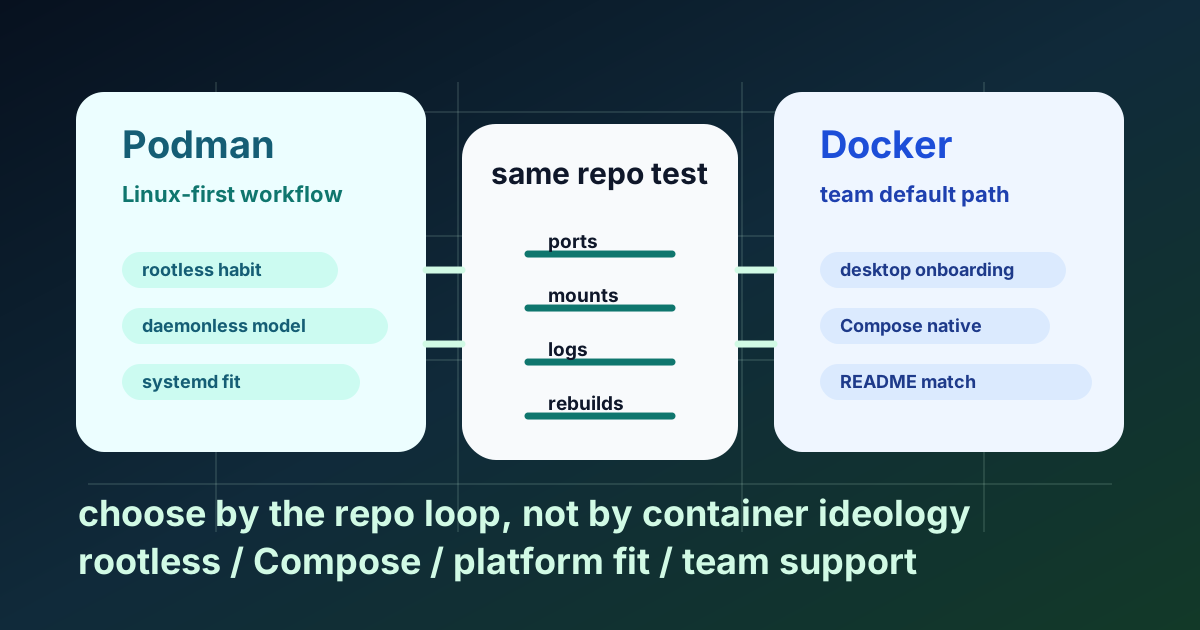
Fast decision table
Choose by workflow, not by ideology.
| Your situation | Better default | Why | Limitation to accept |
|---|---|---|---|
| Linux developer who wants rootless containers as the normal path | Podman | Podman is built around daemonless, rootless Linux workflows, and that shows up in day-to-day use. | Compose compatibility needs explicit testing because podman compose delegates to an external provider. |
| Team with mostly macOS or Windows laptops | Docker | Docker still has the smoother shared onboarding path for desktop-heavy teams. | You are accepting the daemon-centered model and Docker-specific tooling assumptions. |
Team with an existing compose.yaml, docs, and scripts already written around Docker | Docker unless the repo proves otherwise under Podman | The cheapest migration is usually no migration. Matching the existing README is often the right engineering decision. | Individual Linux developers may still prefer Podman locally. |
| Linux team already using systemd for service management | Podman | Podman's Quadlet path fits Linux service-style workflows better than Docker's default local model. | This advantage is mostly meaningful on Linux. |
| Repo depends on first-party Compose features and Docker-oriented tooling | Docker | Docker's Compose workflow is a native part of the official toolchain and ecosystem. | You may give up some of Podman's Linux-native operating model. |
My recommendation in 2026 is plain: Docker is still the safer team default, especially for mixed operating systems and beginner onboarding. Podman is a serious first choice for Linux developers who care about rootless habits, systemd alignment, and a daemonless local model. Do not switch because the internet told you Podman is cleaner. Switch only if the same repo behaves better for your team after a real test.
The real architectural split is not branding
The useful difference is process model.
Docker Engine is documented as a client-server architecture with a long-running daemon. Podman describes its own local workflow as daemonless and Docker-familiar, while the Podman release history also shows an actively maintained project in 2026. That combination matters: Podman is not abandoned niche tooling, but its operating model is still different from Docker's default path.
That sounds abstract until tools enter the picture:
- Docker-oriented scripts often assume a reachable Docker socket or API.
- Podman-oriented Linux workflows feel closer to ordinary user-space process management.
- Compatibility layers help, but compatibility is not the same thing as identical defaults.
If you want the mental model before comparing tools, read How Docker Actually Works. Most confused Podman vs Docker arguments start after skipping the architecture.
docker run --rm -p 8080:80 nginx
podman run --rm -p 8080:80 nginx
The commands look similar. The surrounding assumptions are not.
Rootless is not the deciding factor
A weak comparison says Podman is rootless and Docker is not. That is false.
Docker officially documents rootless mode for both the daemon and containers. Podman also treats non-root operation as a normal part of its documented workflow. So the real distinction is not feature existence. The distinction is friction.
- Docker supports rootless mode.
- Podman makes rootless Linux workflows feel more natural.
- Teams choose defaults based on setup cost, repo compatibility, and onboarding friction more than feature checklists.
In ABCsteps Lesson 06, this is one of the first confusions I correct. Students hear "Podman is more secure" and immediately assume Docker cannot run rootless. That is the wrong lesson. The useful classroom moment comes when we take the same container command, move from a single service to a three-service Compose file, and the discussion changes from slogans to logs, ports, mounts, and teammate onboarding. I have seen beginners become much calmer when the decision is framed this way: first prove the repo loop, then choose the tool. The tool that creates fewer unexplained setup notes is usually the better teaching default for that team.
# Docker rootless setup starts with system prerequisites like uidmap
# then a dedicated setup tool

dockerd-rootless-setuptool.sh install
Compose is where migrations become expensive
For most developers, the real question is not whether docker run and podman run both work. The real question is whether the whole multi-service loop survives unchanged.
Docker Compose is part of Docker's mainstream workflow, and the Docker Compose release stream shows that toolchain is still actively moving in 2026.
Podman's Compose story is different. The podman compose docs describe it as a wrapper around an external compose provider. Podman can use providers such as docker-compose or podman-compose, and that provider choice affects behavior.
That means a fair migration discussion has to say the quiet part out loud: if your team lives inside Compose, Podman is not just a command swap. It is a workflow test.
A same-repo evaluation you can actually run
Use one real repository with three services: api, db, and cache. Keep the file small and boring.
services:
  api:
    build: .
    ports:
      - "3000:3000"
    volumes:
      - .:/app
    depends_on:
      - db
      - cache
  db:
    image: postgres:16
    environment:
      POSTGRES_PASSWORD: app
  cache:
    image: redis:7
Run the Docker path first.
docker compose up --build
Now run the Podman path, but make the prerequisite explicit: this test assumes podman-compose is installed and available on PATH, because podman compose delegates to an external provider.
podman compose version
podman compose up --build
What to compare in the same repo:
- cold start time
- published ports
- bind mount behavior
- service logs
- rebuild behavior after a source change
This is the evaluation I would trust before changing a team standard. In a real migration review, the important result is often not "both commands eventually worked." It is whether the Docker path ran from the existing README, while the Podman path needed an explicit compose provider note, a podman machine note for Mac users, or a volume/port debugging note for one teammate. That extra paragraph is part of the engineering cost.
Here is the shape of an honest outcome:
| Same repo result | Recommendation |
|---|---|
Docker starts from the existing README; Podman needs podman-compose plus one mount note | Keep Docker as the team default, allow Podman for Linux developers who document their local path. |
| Both paths start, ports bind, logs stay readable, and rebuilds behave the same | Let Linux developers use Podman, but keep the repo docs explicit about both commands. |
| Podman gives a cleaner rootless Linux workflow and the team is Linux-first | Make Podman the default after adding the exact provider and machine setup notes to the README. |
If your repo depends on Compose watch-style workflows or Docker-specific helpers, test those explicitly instead of assuming portability. That is where the migration cost usually appears.
For the Compose mental model itself, read Docker Compose Explained: Multi-Container Applications Made Simple.
Operating system matters more than ideology
Linux gives Podman the strongest case.
- Rootless operation feels native.
- Daemonless local use is straightforward.
- Quadlet fits systemd-oriented service management well.
On macOS and Windows, the answer changes. Podman's own documentation is clear that Podman Machine manages a Linux virtual machine on those platforms because containers require a Linux kernel.
podman machine init
podman machine start
That single detail removes a lot of bad advice. Podman is daemonless on Linux. It is not a magical way to avoid virtualization on a MacBook.
So the platform-level recommendation is simple:
- Linux individual developer: Podman deserves real consideration.
- Mac-heavy or Windows-heavy team: Docker is usually the lower-friction default.
- Mixed team: optimize for the repo contract, not personal preference.
Where Podman is genuinely better
Podman earns the recommendation when you actually want its operating model.
One strong case is Linux-first local development where rootless behavior is not an afterthought. Another is when your environment already thinks in systemd units and service files. In that world, Podman is not just a Docker alternative. It fits the rest of the machine better.
Podman also has Kubernetes-adjacent workflows such as podman kube play, which can be useful when you want to exercise container workloads from Kubernetes-style YAML without spinning up a full cluster. That is a practical bridge, not a reason to pretend Podman replaces Kubernetes.
The limitation matters too: Podman's strength is not universal convenience. Its strength is that on Linux, the tool feels aligned with how the platform already works.
Where Docker is still the better team default
Docker keeps winning for one reason: it reduces surprise.
The docs most developers read, the examples most teams paste into READMEs, and the assumptions many editors and scripts carry still point to Docker first. Docker's open-source engine foundation remains visible in the Moby repository, and the surrounding documentation ecosystem reflects that maturity. When a team standard reduces "why does this command behave differently on your machine?" conversations, that is real value.
This is why my advice stays intentionally boring:
- If the repo already works well with Docker, keep Docker unless Podman solves a named problem.
- If you are Linux-first and you care about rootless, daemonless, systemd-aligned workflows, test Podman seriously.
- If your team spans macOS, Windows, and Linux, Docker remains the safer default contract until a same-repo trial proves otherwise.
Tool choice is cheap. Standardizing a workflow your team cannot support is expensive.
What to do next
Run one same-repo comparison this week instead of reading five more opinion posts. Use your real compose.yaml, not a toy benchmark, and record only these results: startup, ports, bind mounts, logs, and code-change behavior.
If you are early in containers, learn Docker well enough to explain images, volumes, ports, and Compose from memory before you chase alternatives. That gives you the baseline needed to judge Podman fairly.
If you are on Linux, test Podman in three steps: one rootless single-container workflow, one Compose repo with an explicit provider installed, and one service you would normally manage with systemd.
If you own team onboarding, keep the default boring. Document one blessed path, note the allowed alternative path, and change the standard only when the alternative reduces friction in the same repo on the operating systems your team actually uses.
To apply this hands-on, use the ABCsteps lesson Netflix Docker: Containerize a Real Service and run the same service loop with Docker first. After that baseline works, repeat the loop with Podman and write down the exact differences instead of arguing from memory.
Apply this hands-on · Module B
Docker: Make Local Software Repeatable
Lesson 06 teaches Docker through a real container workflow. This article helps learners understand when Podman changes the local development trade-off and when Docker remains the simpler team default.
Open lesson