Adding AI to Existing Apps With OpenRouter — One Endpoint, Many Models
Learn how to add AI to an existing app with OpenRouter behind a safe backend boundary, model discovery, guardrails, logging, and evaluation steps.

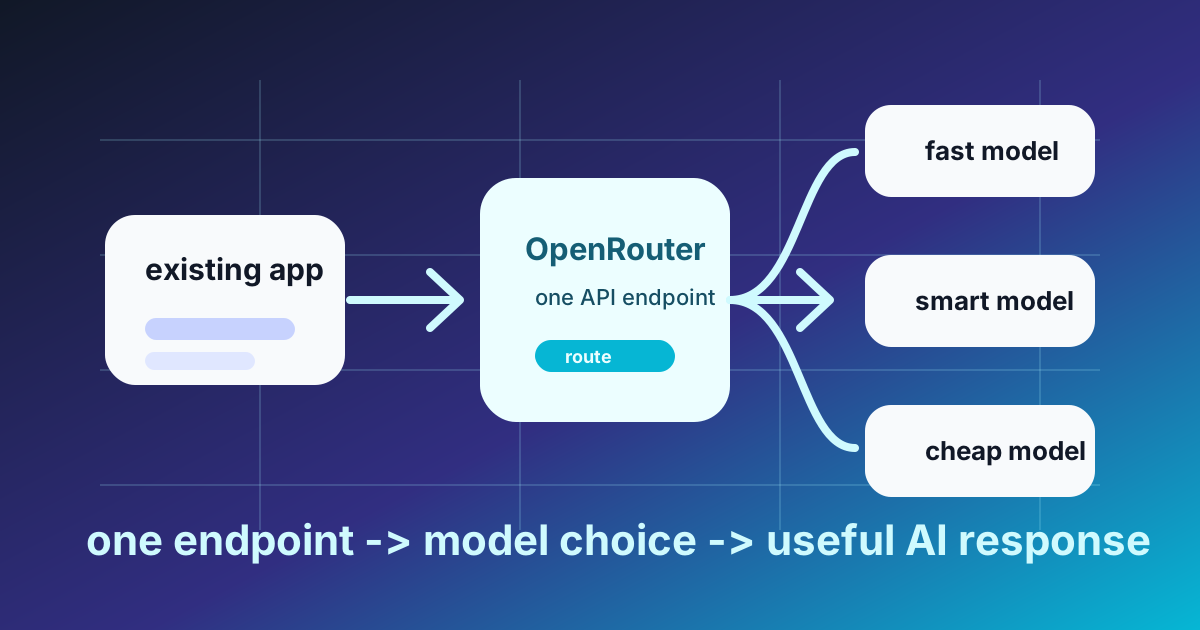
The OpenRouter integration decision
| If your situation looks like this | Start here | Why | Guardrail |
|---|---|---|---|
| Your product needs AI now, but model choice is still moving | OpenRouter behind your backend | One OpenAI-style endpoint lets you test models without rewriting your feature route | Verify the exact model and parameters before rollout |
| You want a narrow route for summarize, classify, explain, or tutor behavior | OpenRouter behind your backend | The UI can ask for a product action while the server owns model choice | Keep model IDs in env vars, not client code |
| You are adding AI to an existing app with real users | OpenRouter behind your backend | You can add input caps, output caps, logging, and fallback logic in one place | Ship one small route before adding streaming or multi-model complexity |
| You already know one direct provider gives you a feature you must use | Direct provider can be simpler | Native SDK behavior is easier to debug when provider choice is settled | Accept tighter coupling and document why portability is less important |
My rule is simple: if model choice is still a live question, start with OpenRouter behind your backend. If provider choice is already settled and you need a native feature, go direct deliberately instead of adding an abstraction by habit.
What OpenRouter actually buys you
Most teams say they want to "add AI." That is too vague to design well. The useful question is narrower: what contract should your app depend on while model choice is still moving?
That is where OpenRouter helps. It exposes an OpenAI-compatible chat completions endpoint and a model catalog you can inspect before rollout. The practical value is not that it makes all models identical. It does not. The value is that your application can speak one stable backend contract while you compare models, providers, and costs behind that boundary. OpenRouter's docs for chat completions and models are the right primary sources here: they show the request shape, supported parameters, and model metadata such as id and supported_parameters.
If you already know you are staying with OpenAI, the case for a gateway gets weaker. OpenAI's own migration guide says the Responses API is recommended for new projects, while Chat Completions remains documented. That matters because "direct OpenAI" is not one thing forever. The native surface changes over time, and going direct gives you faster access to those platform-native features.
The boundary that prevents expensive mistakes
Use this shape:
Browser/UI -> Your backend -> OpenRouter or provider API -> Model
That backend boundary is not optional.
Your browser should not hold the API key. It should not pick arbitrary model IDs. It should not stream unbounded user input straight to a paid model endpoint. If you need the broader split, read Frontend vs Backend — What Lives Where and Why It Matters.
In Lesson 16 reviews, I have repeatedly seen a boring and expensive failure pattern: a learner makes the first request directly from the browser, sees text come back, and thinks the feature is done. Then the real bugs appear. The key is exposed. The model choice lives in client code. Someone pastes a giant prompt. There is no output cap, no usage log, and no easy place to add policy later. When I correct that implementation, I usually do not change the prompt first. I move the call behind one narrow backend route and make the client ask for a product action instead of a raw model.
Before any request leaves your system, your backend should do four jobs:
- Validate input length and shape.
- Map product intent to an allowlisted model.
- Cap output size.
- Log usage and failures.
If you skip those four, provider choice is not your main problem.
Verify the model before you write feature code
The fragile tutorial pattern is: hardcode a model name into the article, then hope it still exists when the reader tries it. The durable pattern is: discover, pin, then call.
Start by checking the current catalog. OpenRouter's models guide documents supported_parameters, which lets you filter for features your route actually uses.
OpenRouter smoke test
This example uses curl for the API request and one small Node command to read the returned JSON. Use Node.js 20 or newer so the smoke test and backend example share the same runtime baseline.
export OPENROUTER_API_KEY="your-key-here"

curl -s "https://openrouter.ai/api/v1/models?supported_parameters=max_tokens" \
  -H "Authorization: Bearer $OPENROUTER_API_KEY" \
  -o openrouter-models.json
Now select the first returned model ID into an environment variable. This keeps the tutorial runnable without pretending one hardcoded model ID will stay correct forever:
export OPENROUTER_MODEL="$(node -e '
const fs = require("fs")
const data = JSON.parse(fs.readFileSync("openrouter-models.json", "utf8"))
const model = (data.data || [])[0]
if (!model?.id) {
  console.error("No model id found in OpenRouter catalog response")
  process.exit(1)
}
console.log(model.id)
')"

echo "$OPENROUTER_MODEL"
Now run the smallest useful call:
curl https://openrouter.ai/api/v1/chat/completions \
  -H "Authorization: Bearer $OPENROUTER_API_KEY" \
  -H "Content-Type: application/json" \
  -d '{
    "model": "'"$OPENROUTER_MODEL"'",
    "messages": [
      { "role": "user", "content": "Reply with exactly: gateway ok" }
    ],
    "max_tokens": 12
  }'
This checks four things quickly:
- The key works.
- The request shape works.
- The model ID is valid when you run the test.
- The chosen model accepts the parameter set you actually sent.
Do not treat the first catalog result as a production recommendation. It is only a connectivity check. For production, filter by capability, cost, context window, latency, provider policy, and the exact parameters your route sends.
If you later decide to go direct with OpenAI, use the same discover-then-pin discipline from the OpenAI models API. For a new OpenAI-only build, also read the Responses migration guide before you lock your API surface. The point is not that one provider path is sacred. The point is that model IDs and platform surfaces are living dependencies.
A backend route that is runnable as written
The earlier draft assumed an ESM setup and global fetch without saying so. That is the kind of tutorial sloppiness that wastes reader time.
This version is explicit.
Runtime assumptions:
- Node.js 20 or newer
- npm 10 or newer
- CommonJS project setup
expressinstalled- Global
fetchavailable from Node 20+
Setup:
mkdir ai-route-demo
cd ai-route-demo
npm init -y
npm install express
Create server.js:
const express = require('express')

const app = express()
app.use(express.json({ limit: '64kb' }))

const MODEL_BY_TIER = {
  fast: process.env.OPENROUTER_MODEL_FAST,
  careful: process.env.OPENROUTER_MODEL_CAREFUL,
}

app.post('/api/summarize', async (req, res) => {
  const startedAt = Date.now()

  try {
    const article = String(req.body.article || '')
    const tier = req.body.tier === 'careful' ? 'careful' : 'fast'
    const model = MODEL_BY_TIER[tier]

    if (!process.env.OPENROUTER_API_KEY) {
      return res.status(500).json({ error: 'OPENROUTER_API_KEY is not configured' })
    }

    if (!model) {
      return res.status(500).json({ error: 'model is not configured for selected tier' })
    }

    if (article.length < 200) {
      return res.status(400).json({ error: 'article too short' })
    }

    if (article.length > 12000) {
      return res.status(400).json({ error: 'article too long' })
    }

    const response = await fetch('https://openrouter.ai/api/v1/chat/completions', {
      method: 'POST',
      headers: {
        Authorization: `Bearer ${process.env.OPENROUTER_API_KEY}`,
        'Content-Type': 'application/json',
        'HTTP-Referer': 'https://abcsteps.com',
        'X-OpenRouter-Title': 'ABCsteps Summarizer',
      },
      body: JSON.stringify({
        model,
        max_tokens: 220,
        messages: [
          {
            role: 'system',
            content: 'Summarize the article in exactly 3 concise bullets for an engineering reader.',
          },
          {
            role: 'user',
            content: article,
          },
        ],
      }),
    })

    if (!response.ok) {
      const errorText = await response.text()
      console.error('ai_summary_failed', {
        model,
        status: response.status,
        latencyMs: Date.now() - startedAt,
      })
      return res.status(502).json({ error: errorText })
    }

    const data = await response.json()
    const usage = data.usage || null

    console.log('ai_summary_completed', {
      model: data.model || model,
      latencyMs: Date.now() - startedAt,
      usage,
    })

    return res.json({
      summary: data.choices?.[0]?.message?.content || '',
      usage,
      model: data.model || model,
    })
  } catch (error) {
    console.error('ai_summary_exception', {
      message: error instanceof Error ? error.message : String(error),
      latencyMs: Date.now() - startedAt,
    })
    return res.status(502).json({ error: 'AI request failed' })
  }
})

app.listen(3000, () => {
  console.log('Server listening on http://localhost:3000')
})
Set environment variables and run it:
export OPENROUTER_API_KEY="your-key-here"
export OPENROUTER_MODEL_FAST="$OPENROUTER_MODEL"
export OPENROUTER_MODEL_CAREFUL="$OPENROUTER_MODEL"
node server.js
For the smoke route, using the same verified model for both tiers is fine because you are checking the route, not making a model-quality decision. When you start evaluating quality, set OPENROUTER_MODEL_CAREFUL to a second verified model ID chosen from the catalog.
Test the route:
curl http://localhost:3000/api/summarize \
  -H "Content-Type: application/json" \
  -d '{
    "tier": "fast",
    "article": "This is a long enough article body to pass validation. Replace this string with at least 200 characters of real content before testing the route in practice. This sentence exists only so the example can run against the validation guard."
  }'
The useful part is not Express. The useful part is the contract. The client asks for summarize behavior. The backend decides which model is allowed to serve that behavior, logs the result, and turns upstream failure into a controlled response instead of a surprise crash.
In ABCsteps implementation reviews, this is where the correction usually becomes visible. Once the route logs model, latency, and usage, the conversation changes from "AI feels slow" to "this model took 1800 ms on this input and returned this usage object." That is the moment an AI feature becomes debuggable backend software.
If you are still learning this layer, pair it with Build Your First REST API With Node.js and Express.
Required headers versus example headers
Authorization matters because it authenticates the request. Content-Type: application/json matters because you are sending JSON.
OpenRouter also documents HTTP-Referer and X-OpenRouter-Title. Those are attribution headers, not security controls. That distinction matters because beginners often cargo-cult every header they see and then cannot tell which one actually broke the request.
The broader lesson is worth keeping: copy request shapes with intent, not by imitation.
Same-repo evaluation task: test the feature before expanding it
Do not decide that "AI is working" from one happy response. Run one narrow feature against your own data before you expand the integration.
A good evaluation task looks like this:
- Feature: summarize a support ticket thread into 3 action bullets.
- Dataset: the same 20 real ticket threads.
- Prompt: identical across both paths.
- Output contract: identical across both paths.
- Score: latency, token usage, output quality, and failures.
Use a tiny wrapper so the rest of the app does not know which model is active:
async function summarizeTicket(thread) {
  const startedAt = Date.now()

  const response = await fetch('https://openrouter.ai/api/v1/chat/completions', {
    method: 'POST',
    headers: {
      Authorization: `Bearer ${process.env.OPENROUTER_API_KEY}`,
      'Content-Type': 'application/json',
      'HTTP-Referer': 'https://abcsteps.com',
      'X-OpenRouter-Title': 'ABCsteps Eval',
    },
    body: JSON.stringify({
      model: process.env.OPENROUTER_MODEL_FAST,
      max_tokens: 180,
      messages: [
        {
          role: 'system',
          content: 'Summarize the ticket into 3 action bullets. Do not repeat the customer wording.',
        },
        {
          role: 'user',
          content: thread,
        },
      ],
    }),
  })

  const data = await response.json()

  return {
    latencyMs: Date.now() - startedAt,
    model: data.model,
    usage: data.usage || null,
    output: data.choices?.[0]?.message?.content || '',
    ok: response.ok,
  }
}

module.exports = { summarizeTicket }
Then do one concrete same-repo task:
- Save 20 representative ticket threads as JSON in your repo.
- Run the wrapper against all 20 inputs.
- Record latency, token usage, empty outputs, JSON parse failures, and whether the output followed the requested 3-bullet contract.
- Only after this passes should you add a second model, streaming, fallback logic, or provider comparison.
Your first scorecard can be this small. If you are deciding gateway versus direct provider, keep the task identical and change only the provider path:
| Run | Path | Model ID | Median latency | Usage captured | Contract followed | Failures |
|---|---|---|---|---|---|
| Gateway baseline | OpenRouter | OPENROUTER_MODEL_FAST | Record from logs | Yes or no | 18/20, for example | Count empty, malformed, or timeout responses |
| Direct control | Direct provider | Provider model env var | Record from logs | Yes or no | 18/20, for example | Count empty, malformed, or timeout responses |
| Gateway careful | OpenRouter | OPENROUTER_MODEL_CAREFUL | Record from logs | Yes or no | 20/20, for example | Count empty, malformed, or timeout responses |
Those example rows are not universal benchmark results. They are the shape of the evidence you should collect from your own route before deciding whether "fast" is good enough or "careful" is worth the extra latency.
For the ticket-summary task, quality means more than "it sounded good." Check whether the output missed any action item, repeated the customer's emotional wording instead of summarizing it, invented a next step that was not in the thread, or produced more than 3 bullets. Those are the failures a real support workflow will feel.
That is the test that matters for an existing app. Not a benchmark screenshot. Not a vendor demo. One feature, one route, one dataset, one boring pass/fail loop.
OpenRouter trade-offs to accept
OpenRouter is useful, but it is still another production dependency. Accept these trade-offs explicitly:
- Gateway dependency: if the gateway path is down or degraded, your route is affected even if the underlying model provider is healthy.
- Compatibility lag: provider-native features can appear first in the direct provider API before they are available through a compatible gateway shape.
- Model-specific parameters: the endpoint style may be familiar, but model behavior and supported parameters still differ.
- Debugging surface: a failed request can involve your app, the gateway, the provider behind the gateway, the selected model, or a parameter mismatch.
That is why I still keep the backend contract narrow. If OpenRouter stops being the right fit later, the UI should not need to know.
When not to use OpenRouter
OpenRouter is not automatically better because it is more flexible.
A direct provider route is the stronger call when:
- You already know OpenAI is the provider you want.
- You want new OpenAI platform features without waiting for compatibility work.
- You want the smallest possible debugging surface.
- Your compliance or procurement flow prefers a direct vendor relationship.
- Your team is willing to accept tighter coupling in exchange for simpler operations.
The limitation is clear: if you later want to compare providers, you will have more refactoring to do unless you already protected the rest of the app behind a narrow backend contract.
Streaming changes your failure shape
Do not add streaming first.
OpenRouter's streaming docs call out an operational detail many teams miss: if an error happens after tokens have already started streaming, the HTTP status cannot change because the headers were already sent. The error arrives later as a Server-Sent Event, and the HTTP status remains 200 OK.
That means a streaming UI needs different failure handling from a normal JSON route. You are not dealing with only success or failure anymore. You are dealing with partial output, then maybe failure.
My recommendation is plain:
- Get the synchronous route stable first.
- Add bounded input and bounded output.
- Log model, latency, and usage.
- Add streaming only after the non-streaming path already behaves well.
A surprising amount of "AI integration" pain is just normal distributed-system pain wearing a new label.
Where this fits in the ABCsteps path
This article is the architecture view. Lesson 16 is where you wire the feature into the project. If you want model-side theory, continue to How Large Language Models Actually Work — Tokens, Attention, and the Math. If your endpoint works but the output is weak, the next problem is usually prompting, so read Prompt Engineering Essentials — Beyond the Polite Question. Before shipping the feature, pair it with the Deployment Day Checklist so environment variables, logs, and production checks do not become afterthoughts.
What to do next
- Query the model catalog before you write app code, and pin only verified model IDs in environment variables.
- Put the model call behind one backend route where the client asks for a product action, not a raw model.
- Add a tiny wrapper so your UI does not know which model serves the request.
- Run one same-repo evaluation on 20 real inputs and compare latency, token usage, output quality, and failures.
- If OpenAI is already the settled provider, read the current Responses API guidance before you lock in Chat Completions for a new build.
- Apply the pattern in Lesson 16, where the feature stops behaving like a demo and starts behaving like backend software.
Apply this hands-on · Module D
Adding AI to Your App
Lesson 16 wires AI into the project. OpenRouter is the gateway the curriculum uses. This article explains the one-endpoint, many-models pattern that lets you swap providers without rewriting code.



Skill vocabulary from the lesson
Tool logos are curriculum references only: no affiliation, hiring promise, salary promise, or placement guarantee.
Company skill surface
Applied AI teams value bounded features that handle errors, cost, and user expectations honestly.





Team contexts
Applied AI products, Backend guardrails, Customer-facing automation
Proof prompt
Show the AI feature boundary, fallback behavior, cost note, and structured output contract.
Company and platform logos are ecosystem references only: no affiliation, endorsement, interview access, hiring preference, salary outcome, or placement guarantee.
Open lesson
Divyanshu Singh Chouhan
Founder, ABCsteps Technologies
Founder of ABCsteps Technologies. Building a 20-lesson AI engineering course that teaches AI, ML, cloud, and full-stack development through written lessons and real projects.


After this article
Choose the next proof-bearing step.
Do not collect another article by default. Move into a public lesson, continue a focused path, or bring a concrete repo question to a paid-plan conversation.
Use paid guidance only when it changes the artifact: a repo, demo, written note, architecture decision, or review trail another person can inspect.
 Build
BuildContinue public lessons
Open the 20-lesson path and turn the concept into a runnable artifact.
 Read
ReadFollow a focused path
Use a short article sequence only when one lesson needs more context.
DecideCompare plans
Use a paid plan only if feedback, accountability, or review would change the work.
 Ask
AskAsk with context
Send the lesson, repo, error, or decision you want reviewed before scheduling a call or review.
Related Articles
On this page
Article context
Applied AI surface
Read this article as AI product vocabulary: model calls, prompt boundaries, structured output, verification, and cost awareness.


Tool and platform logos are article-context references only: no affiliation, endorsement, interview access, hiring promise, salary promise, or placement guarantee.
Share