PostgreSQL vs SQLite — When to Pick Which Database
A new engineer hears 'use a database' and reaches for the most popular thing — usually PostgreSQL, sometimes MySQL. A senior engineer asks one question first...

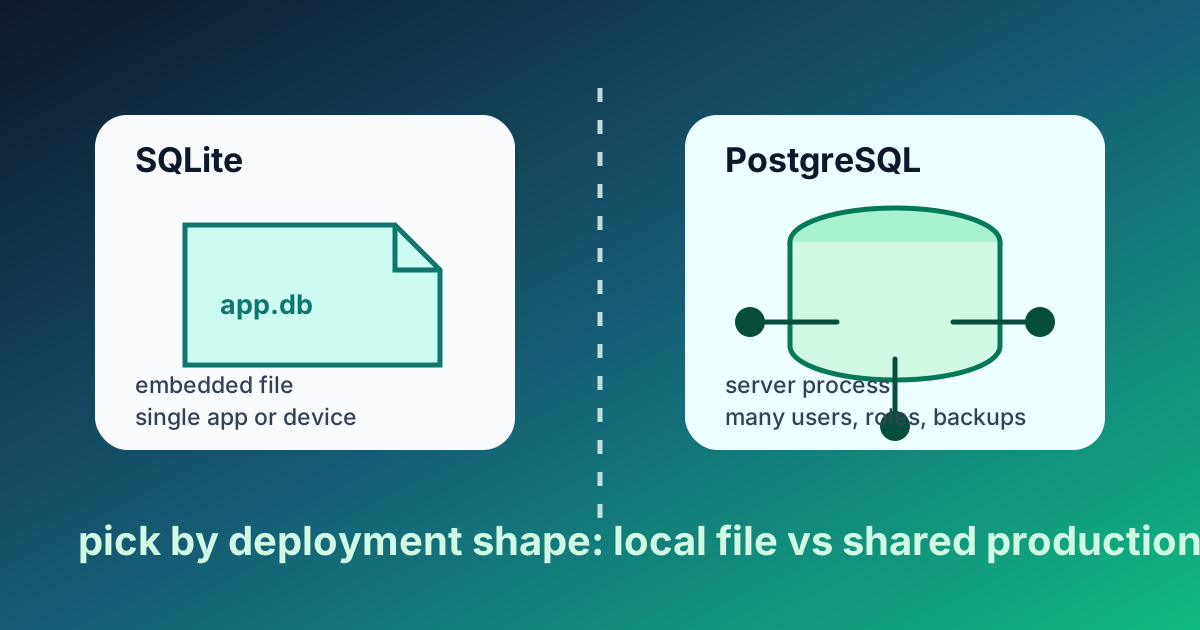
Two Databases, Two Worlds
A new engineer hears "use a database" and reaches for the most popular thing — usually PostgreSQL, sometimes MySQL. A senior engineer asks one question first: does this app actually need a separate database server? Half the time the answer is no, and SQLite is the better tool. The other half the answer is yes, and PostgreSQL is the right call.
Knowing which half you are in is the engineering decision. This article is that decision laid out plainly.
What SQLite Actually Is
SQLite is not a server. There is no sqlite daemon running in the background. SQLite is a C library — about 150,000 lines of code — that you embed into your application. Your app calls SQLite functions, which read and write a single file on disk. That file is your database.
The whole database is one .db file. Backups are cp database.db backup.db. Migrations are file changes you commit to git. There is no network, no port, no password, no separate process to start. Your app and your database run in the same process.
This is unusual. Almost every other database — PostgreSQL, MySQL, MongoDB, Redis, SQL Server — runs as a separate server you talk to over a network. SQLite is the outlier, and the outlier-ness is the whole point.
What PostgreSQL Actually Is
PostgreSQL is a client-server database. You install the postgres daemon on a machine. It opens a port (usually 5432) and listens for connections. Your application is a client that connects, sends SQL queries, and reads responses. Multiple clients can connect at once. The clients can be on the same machine, the same network, or the other side of the world.
The database lives in PostgreSQL's own files in a data directory it owns. You do not touch those files directly — the daemon controls them. You interact with the database only through SQL queries sent over connections.
This is the model most engineers think of when they hear "database." It is the older, more flexible model.
When SQLite Wins
SQLite is the right choice for a startling number of cases. The official SQLite documentation lists the appropriate use cases at length, and they are not the marginal ones:
Embedded apps — desktop software that needs local storage. Apple's iMessage, every browser's history database, almost every iOS app, Adobe Lightroom, every Skype installation. SQLite is the most-deployed database in the world by a wide margin precisely because of this category.
Edge-deployed web apps — a small or medium site where the database can sit next to the app on the same disk. Cloudflare's D1, Turso, and LiteFS are real production systems built on SQLite at the edge. For a website with up to a few thousand requests per second of mostly-reads, SQLite is faster than network-bound PostgreSQL because there is no network.
Internal tools and prototypes — anything you would otherwise build on a Google Sheet or an Airtable. The setup cost of SQLite is zero. The setup cost of PostgreSQL is at least an afternoon.
Read-heavy workloads — SQLite handles concurrent reads beautifully. The library serializes writes to a single writer at a time, which is a bottleneck only if your write rate is genuinely high.
Single-user desktop apps — anything where there is one user and one process. The whole client-server overhead is wasted.
The SQLite team's own slogan captures it: "SQLite does not compete with client-server databases. SQLite competes with fopen()." When you would otherwise be parsing a CSV or rolling your own file format, SQLite is the better choice.
When PostgreSQL Wins
PostgreSQL is the right choice the moment any of these are true:
Multiple application servers need to read and write the same data. This is the canonical case. Two web servers behind a load balancer, both writing to the same database, cannot use SQLite. They can both connect to the same PostgreSQL.
High concurrent write throughput. SQLite's "one writer at a time" model becomes the bottleneck somewhere around hundreds of writes per second on commodity hardware (the exact number depends on transaction size and disk speed). PostgreSQL's row-level locking and MVCC let many writers proceed in parallel.
Replication and high availability. PostgreSQL has streaming replication built in — write to a primary, read from one or more replicas, fail over automatically. SQLite has nothing equivalent in the standard library; tools like Litestream and LiteFS bolt replication on, but it is an addition, not a built-in.
Rich data types and queries. PostgreSQL has native JSON with indexed paths (JSONB), arrays, full-text search with stemming, geographic data via PostGIS, and a query planner that handles complex joins on hundreds of millions of rows. SQLite has competent versions of most of these, but PostgreSQL is the more powerful tool when you need them.
Strict permissions, roles, and audit. PostgreSQL has a full role-and-privileges system that lets you say "this connection can read these tables but not those, and cannot write at all." SQLite has no roles — anyone who can read the file can do anything to it.
Compliance regimes that require centralized data. If your auditor needs to see one database with one access log, you need a server. SQLite files scattered across application machines do not pass that audit.
The Honest Trade-off Table
| Concern | SQLite | PostgreSQL |
|---|---|---|
| Setup cost | Zero (it's a library) | Real (install, configure, secure) |
| Operational overhead | None | Backups, monitoring, upgrades, replicas |
| Latency for app calls | Microseconds (in-process) | Milliseconds (network round trip) |
| Concurrent writers | One at a time | Many in parallel |
| Multiple app servers | No | Yes |
| Replication | Add-on (Litestream, LiteFS) | Built-in |
| JSON / full-text search | Yes, simpler | Yes, more powerful |
| Per-user permissions | No | Yes |
| Backup strategy | Copy the file | Logical or physical backup tools |
| Cost at small scale | Free, no infra | Hosted: ~$15-50/month minimum |
There is no winner row. There is a winner per row, and the right pick is whichever wins more rows for your situation.
A Decision Process That Actually Works
When I am picking the database for a new project, I run through these questions in this order:
- Will more than one machine need to write to this data? If yes, PostgreSQL. Stop here.
- Does the data fit on one disk and stay there? If no (tens of terabytes, or growing fast), PostgreSQL. Stop here.
- Do I need streaming replication out of the box? If yes and I cannot use Litestream or D1, PostgreSQL. Stop here.
- Do I need per-user roles inside the database? If yes, PostgreSQL.
- Is this an embedded app, an edge app, an internal tool, or a prototype? SQLite.
For most small-to-medium web apps in 2026, the honest answer is "SQLite is fine until it isn't, and you'll know when it isn't." Cloudflare's D1, Turso, and LiteFS make this easier than it used to be — you can start with embedded SQLite and migrate to a distributed SQLite-compatible system without rewriting your queries.
"But Will I Outgrow It?"
This is the most common worry I hear from new engineers, and it is mostly misplaced. Three honest points:
- Most projects never reach the scale where SQLite breaks. Most ideas die long before that. Optimizing for a scale you do not have is the textbook premature optimization.
- Migrating SQLite → PostgreSQL is mechanical. The SQL is mostly portable. Tools like
pgloadermigrate a real database in minutes. The hard parts of scaling — caching, sharding, query optimization — are the same problems on either database. - SQLite is itself getting more scalable. D1, Turso, LiteFS, and others let you run SQLite-compatible workloads across regions with replication. The "outgrow" cliff is much further out than it was five years ago.
If you are still nervous, write your data access layer behind an interface (a UserRepository class, say) so you can swap the implementation without touching the rest of the app. That is the real protection against database choice — not picking the "biggest" database upfront.
Where This Fits
Lesson 14 of the ABCsteps curriculum has you build a leaderboard with SQLite. Lesson 15 ships it. The choice of SQLite is not a beginner shortcut — it is the right tool for that workload, full stop. This article is the reasoning. The lesson is the practice. By the end of both, you will have shipped a real database-backed application and you will know exactly when to reach for PostgreSQL instead.
Apply this hands-on · Module C
Databases: Store Data Permanently
Lesson 14 uses SQLite as a starter database. This article explains why SQLite is right for this lesson and what changes when a project outgrows it.



Skill vocabulary from the lesson
Tool logos are curriculum references only: no affiliation, hiring promise, salary promise, or placement guarantee.
Company skill surface
Data-backed product teams need engineers who know what must persist and what can remain temporary.






Team contexts
Backend teams, Data applications, Product analytics
Proof prompt
Show the table shape, one insert, one read, and the reason the data survives a refresh.
Company and platform logos are ecosystem references only: no affiliation, endorsement, interview access, hiring preference, salary outcome, or placement guarantee.
Open lesson
Divyanshu Singh Chouhan
Founder, ABCsteps Technologies
Founder of ABCsteps Technologies. Building a 20-lesson AI engineering course that teaches AI, ML, cloud, and full-stack development through written lessons and real projects.


After this article
Choose the next proof-bearing step.
Do not collect another article by default. Move into a public lesson, continue a focused path, or bring a concrete repo question to a paid-plan conversation.
Use paid guidance only when it changes the artifact: a repo, demo, written note, architecture decision, or review trail another person can inspect.
 Build
BuildContinue public lessons
Open the 20-lesson path and turn the concept into a runnable artifact.
ReadFollow a focused path
Use a short article sequence only when one lesson needs more context.
DecideCompare plans
Use a paid plan only if feedback, accountability, or review would change the work.
 Ask
AskAsk with context
Send the lesson, repo, error, or decision you want reviewed before scheduling a call or review.
Related Articles
On this page
Article context
Structured data surface
Read this article as data vocabulary: shape, validation, storage, query behavior, and contracts between systems.

Tool and platform logos are article-context references only: no affiliation, endorsement, interview access, hiring promise, salary promise, or placement guarantee.
Share