What Is JavaScript and Why the Web Runs on It
Learn what JavaScript is, why browsers standardize on it, and how events, state, DOM updates, fetch, and storage make pages behave through runnable examples.

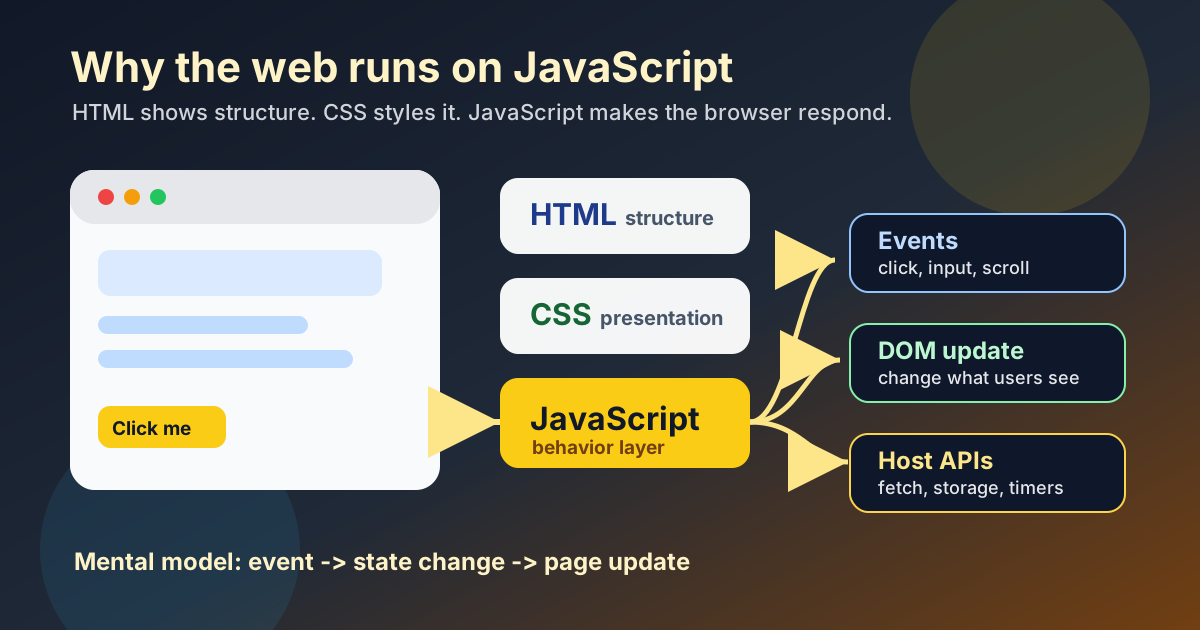
JavaScript Is the Browser's Behavior Language
A browser can render HTML and CSS on its own. The moment a page needs behavior, though, it needs executable code: respond to a click, validate a form, fetch data, animate a game loop, remember a setting.
That executable layer is JavaScript.
To say it precisely: JavaScript is the standardized scripting language that major browsers expose to page authors by default. MDN introduces JavaScript on the Web platform as the scripting language for web pages; browsers implement the ECMAScript standard, maintained as ECMA-262, and then expose browser-specific APIs around it through objects such as window, document, fetch, and localStorage.
That precision matters. Browsers can also run WebAssembly, but WebAssembly is a lower-level binary format, not the everyday language most beginners write first. TypeScript, Elm, ClojureScript, and similar tools do not bypass JavaScript either; they reach the browser by compiling to JavaScript.
If your goal is: "I want code to run inside a normal browser tab on a stranger's device without asking them to install anything," JavaScript is still the baseline target.
When I explain this to a beginner, I do not start with syntax. I start with the browser tab in front of them: "This page already knows how to show text and color. JavaScript is what lets it respond."
The short version:
- JavaScript became the browser's standardized scripting contract.
- The browser gives JavaScript safe access to page APIs such as DOM events,
fetch, and storage. - Users already have the browser's JavaScript engine installed, so distribution is zero-install.
- Other languages can join the web, but usually by compiling to JavaScript, running on the server, or entering through WebAssembly.
| Layer | Job | Beginner test |
|---|---|---|
| HTML | Defines page structure | Can I point to the heading, paragraph, input, or button? |
| CSS | Defines presentation | Can I explain why it has that color, spacing, or layout? |
| JavaScript language | Defines program logic | Can I read the variable, function, condition, or loop? |
| Browser host APIs | Connect code to the page | Can I identify document, fetch, localStorage, or an event listener? |
Why Not Python, Java, or C++ Directly in the Browser?
Because the web needed one safe, portable, built-in scripting contract.
Browsers are not just language interpreters. They are security sandboxes that execute untrusted code from millions of sites. For the web to work, browser vendors needed a language they could standardize, ship everywhere, and tie to the page model consistently. That language became JavaScript.
Other languages can absolutely participate, but not in the same direct way:
- Python is popular on servers, but browsers do not ship a built-in Python runtime for page scripts.
- Java once tried the browser route through applets, but that path depended on plug-ins instead of the built-in Web platform. Oracle listed Java Applet, WebStart, and the Java plug-in among JDK 9 deprecated features, and Mozilla documents that Firefox removed support for NPAPI plug-ins such as Java.
- C and C++ can reach the browser today through WebAssembly toolchains, but that still rides inside the browser's existing execution model rather than replacing the platform's JavaScript-first contract.
The practical consequence for learners is simple: if you want to understand why a web page changes when you click, type, scroll, or fetch data, you need JavaScript first. You can add TypeScript later, and you can learn WebAssembly later, but the browser's day-to-day behavior model is still JavaScript plus browser APIs.
Why the Web Settled on This Contract
JavaScript remained central because it matched the web's distribution model.
The browser already had to be installed. The browser already had to sandbox untrusted pages. The browser already had to expose a page model through HTML, CSS, DOM, events, and network APIs. Standardizing one built-in scripting language meant a developer could ship behavior to Chrome, Firefox, Safari, and Edge without asking the user to install a separate runtime.
That is the real reason the web runs on JavaScript. It is not that JavaScript is perfect. It is that the JavaScript-plus-browser-API contract became the lowest-friction way to distribute interactive software to everyone with a browser tab.
The Three-Layer Model That Keeps Web Development Sane
I teach beginners to keep one small model in their head:
- HTML defines structure.
- CSS defines presentation.
- JavaScript defines behavior.
A heading is HTML. Its spacing and color are CSS. What happens when a user clicks a button under that heading is JavaScript.
This separation is not academic. It prevents a lot of confusion later. When someone says, "I built a website," they usually built all three layers together, but each layer has a different job. If that boundary still feels blurry, read HTML and CSS — The Visible Language of the Web first and then come back here.
JavaScript the Language vs the Browser the Host
This is the distinction that saves beginners from weeks of unnecessary confusion.
JavaScript the language gives you things like:
- variables
- functions
- objects and arrays
- loops and conditionals
- modules
- promises and
async/await
The browser host gives you things like:
documentwindowfetchlocalStorage- timers such as
setTimeout - DOM events such as
clickandinput
So in this line:
const title = document.title
const is JavaScript syntax. The variable is JavaScript. But document is not part of ECMAScript by itself. It exists because the browser provides it.
MDN separates JavaScript language reference from the browser's Web APIs for exactly this reason. JavaScript is the language, and the environment provides extra APIs. That is why the same language can run in different places.
The Beginner Mistake I See in Lesson 01
In Lesson 01, students build a small browser game. The most common failure mode is not syntax. It is a broken mental model.
They write some code like this:
score = score + 1
Then they ask, "Why didn't the number on the page change?"
Because changing a JavaScript variable does not automatically repaint the page. The browser only shows new text if your code updates the DOM.
The broken model is: "JavaScript state and the screen are the same thing."
The corrected model is: "JavaScript changes data; then JavaScript tells the browser what to show."
When I teach this in ABCsteps, I deliberately stop the lesson at that moment. In the first Snake game sessions, the learner usually celebrates because the score variable changed, then looks confused because the screen still shows the old number. My correction is always the same: I ask them to point to the exact line that changes memory, then the exact line that changes the screen. I do not move forward until that sentence feels obvious. That tiny separation prevents a bigger future bug: later, when the same student learns React, Vue, or any state library, they already understand that UI is a reflection of state, not the state itself.
That is why this works:
let score = 0
const scoreText = document.getElementById('score')

score += 1
scoreText.textContent = `Score: ${score}`
I keep repeating this in class because once it clicks, frontend code stops feeling magical. A game loop, a counter, a form error, a dark-mode toggle, and a live search box are all variations of the same pattern:
- Read an event.
- Update state.
- Update the page.
If you understand that loop, the browser becomes much easier to reason about.
A Full Example You Can Run in One File
Create a file called index.html, paste this in, and open it in your browser. If you need a clean editor setup first, use the VS Code setup guide.
<!doctype html>
<html lang="en">
  <head>
    <meta charset="UTF-8" />
    <meta name="viewport" content="width=device-width, initial-scale=1.0" />
    <title>JavaScript first demo</title>
  </head>
  <body>
    <h1 id="heading">JavaScript is waiting</h1>
    <p id="count">Clicks: 0</p>
    <button id="increment">Click me</button>
    <button id="reset">Reset</button>

    <script>
      const heading = document.getElementById('heading')
      const countText = document.getElementById('count')
      const incrementButton = document.getElementById('increment')
      const resetButton = document.getElementById('reset')

      let count = Number(localStorage.getItem('click-count') || 0)
      countText.textContent = `Clicks: ${count}`

      incrementButton.addEventListener('click', () => {
        count += 1
        countText.textContent = `Clicks: ${count}`
        heading.textContent = 'The page is reacting'
        localStorage.setItem('click-count', String(count))
      })

      resetButton.addEventListener('click', () => {
        count = 0
        countText.textContent = 'Clicks: 0'
        heading.textContent = 'JavaScript is waiting'
        localStorage.removeItem('click-count')
      })
    </script>
  </body>
</html>
This one file already shows three real browser jobs:
- reading elements from the DOM with
document.getElementById(...) - reacting to user actions with
addEventListener(...) - storing small persistent values with
localStorage
Refresh the page after a few clicks. The count survives because the browser environment stored the value outside the current screen paint.
Use the Console Before You Use a Framework
Open DevTools, switch to the Console tab, and run these commands one by one:
1 + 1
Expected result: 2
document.title
Expected result: the current page title.
document.body.style.backgroundColor = 'lightblue'
Expected result: the page background changes immediately.
[...document.querySelectorAll('a')].length
Expected result: a number representing the links on the page.
This is the fastest way to make JavaScript real. You type code, the browser reacts, and the feedback loop becomes immediate.
JavaScript Is Also How Pages Talk to Servers
Modern pages do not stop at clicks and counters. They fetch data from APIs, receive JSON, and update the UI from that response.
If JSON still feels abstract, read What Is JSON and Why Does Every Application Use It next. If APIs feel fuzzy, keep What Is an API and How Do APIs Actually Work nearby.
Paste this into your browser console:
async function loadTodo() {
  const response = await fetch('https://jsonplaceholder.typicode.com/todos/1')
  const data = await response.json()
  console.log(data)
}

loadTodo()
Success looks like a small object with fields such as userId, id, title, and completed. If the demo endpoint is unavailable, the lesson is still the same: fetch() asks a URL for data, await waits, and .json() converts the response into a JavaScript object.
That tiny example includes most of modern frontend work in miniature:
fetch(...)sends an HTTP requestawaitwaits for the responseresponse.json()parses JSON into a JavaScript objectconsole.log(data)lets you inspect the returned value
Once you can read this loop calmly, web applications stop looking mystical. They become understandable systems: events, requests, data, and UI updates.
Where Node.js Fits Without Creating More Confusion
JavaScript is not limited to the browser. Node.js is a JavaScript runtime for running JavaScript outside the browser.
Same language, different host.
In the browser, you get document, the DOM, and page events. In Node.js, you get filesystem access, process APIs, and server capabilities. You can start an HTTP server in Node.js, but there is no page DOM unless you simulate one.
That is why document.title works in a browser console and fails in a plain Node.js script. The language did not change. The environment did.
If you want the fuller architectural picture after this article, read Frontend vs Backend — What Lives Where and Why It Matters.
TypeScript and WebAssembly Without the Confusion
Two technologies regularly get mixed into beginner JavaScript conversations too early.
TypeScript
TypeScript adds static types and better tooling before runtime. But the browser does not execute raw TypeScript source. It executes JavaScript generated from it.
function add(a: number, b: number): number {
  return a + b
}
Becomes JavaScript like this:
function add(a, b) {
  return a + b
}
TypeScript is helpful. It is not a replacement runtime.
WebAssembly
WebAssembly lets browsers execute compiled low-level modules efficiently. It is valuable for things like games, media processing, CAD, scientific workloads, and language runtimes.
But WebAssembly does not remove the need to understand JavaScript for normal web work. The page still lives in a browser environment shaped around the DOM, events, and JavaScript interop.
For most beginners, the right sequence is:
- learn JavaScript and browser APIs
- build a few real pages
- add TypeScript when the codebase grows
- learn WebAssembly only when the problem actually needs it
What to do next
- Create
index.htmland run the full example from this article. - Change the
click-countstorage key and verify that you understand why the old value no longer appears. - Open DevTools and run the console exercises until
document, DOM selection, and style changes feel ordinary. - Run the
fetch()example and inspect the returned object so JavaScript, APIs, and JSON connect in one mental model. - Read What Is JSON and Why Does Every Application Use It if the response shape feels unfamiliar.
- If you are following the curriculum, go to Lesson 01 and build the browser game. This article gives you the runtime model; the lesson gives you the hands-on proof.
Apply this hands-on · Module A
AI-Assisted Code: Your First App
Lesson 01 has learners build a small browser game. JavaScript is the browser behavior layer they meet first; this article gives the why before the lesson gives the hands-on.



Skill vocabulary from the lesson
Tool logos are curriculum references only: no affiliation, hiring promise, salary promise, or placement guarantee.
Company skill surface
Product teams value AI-assisted speed only when the learner can verify the result.






Team contexts
Product engineering, AI tooling teams, Frontend prototyping
Proof prompt
Show the prompt, the generated change, the bug you found, and the final working browser demo.
Company and platform logos are ecosystem references only: no affiliation, endorsement, interview access, hiring preference, salary outcome, or placement guarantee.
Open lesson
Divyanshu Singh Chouhan
Founder, ABCsteps Technologies
Founder of ABCsteps Technologies. Building a 20-lesson AI engineering course that teaches AI, ML, cloud, and full-stack development through written lessons and real projects.


After this article
Choose the next proof-bearing step.
Do not collect another article by default. Move into a public lesson, continue a focused path, or bring a concrete repo question to a paid-plan conversation.
Use paid guidance only when it changes the artifact: a repo, demo, written note, architecture decision, or review trail another person can inspect.
BuildContinue public lessons
Open the 20-lesson path and turn the concept into a runnable artifact.
 Read
ReadFollow a focused path
Use a short article sequence only when one lesson needs more context.
DecideCompare plans
Use a paid plan only if feedback, accountability, or review would change the work.
 Ask
AskAsk with context
Send the lesson, repo, error, or decision you want reviewed before scheduling a call or review.
Related Articles
On this page
Article context
Programming language surface
Read this article as programming vocabulary: syntax, runtime behavior, types, debugging, and readable implementation.


Tool and platform logos are article-context references only: no affiliation, endorsement, interview access, hiring promise, salary promise, or placement guarantee.
Share